


Google is bringing Gemini computer use to Mac, letting subscribers automate desktop tasks while monitoring the assistant’s actions.
Google is adding computer-use capabilities to its Gemini app for Mac, letting the assistant carry out tasks across desktop apps, files, and websites. The feature, announced on November 19, can handle multistep jobs such as sorting files or filling out forms while users monitor its actions. It will initially be available in English in the United States to subscribers of Google AI Plus, Pro, or Ultra. The launch expands Google’s agent features but also raises questions about permissions, oversight, and reliability.
Gemini Mac app gains computer-use tools
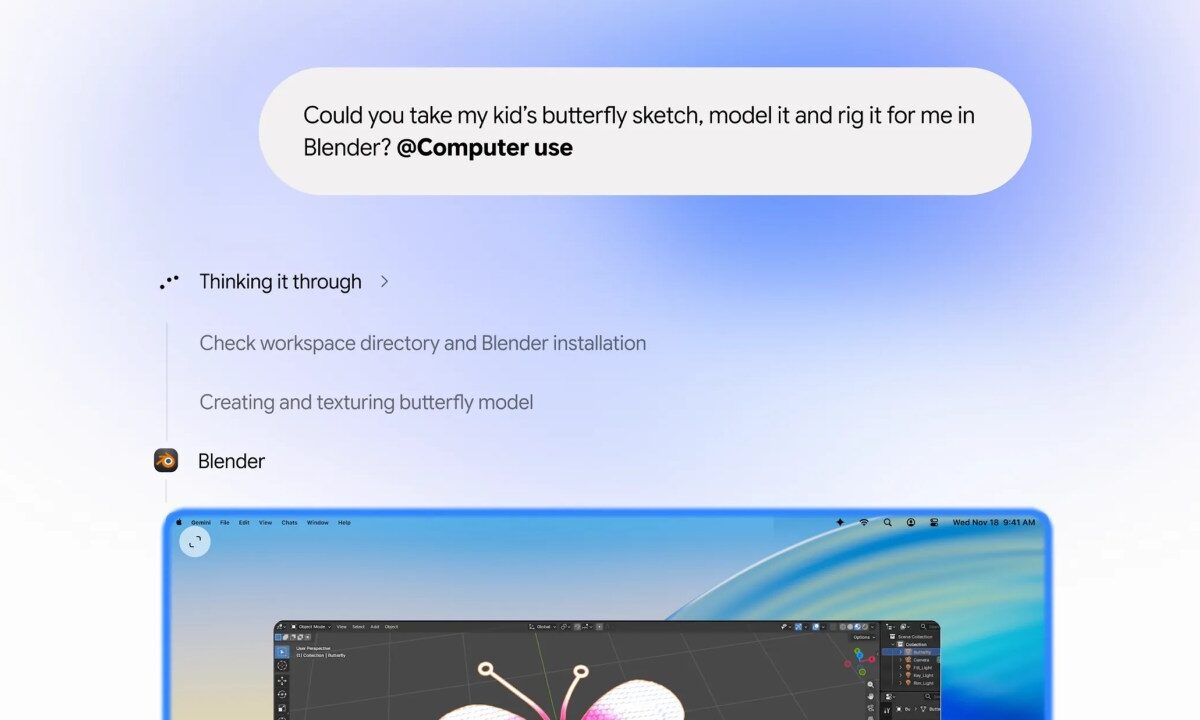
The new feature lets Gemini take actions on a Mac instead of only responding in a chat. After a user gives an instruction, the assistant can navigate native apps and websites in the background. Google says users can watch the agent work in a live preview while continuing to use their screen and cursor.
The feature is designed for tasks that involve several steps. Google’s examples include organizing files into folders, repeating actions across a batch of documents, and filling in online forms. It can also create a slideshow using files or information from web dashboards.
This kind of system is often called computer use or an AI agent. In practical terms, the assistant interacts with a computer interface to carry out requested actions. That differs from a standard chatbot, which generally provides instructions for a person to follow.
How Gemini keeps users in control
Google says users can pause or stop Gemini’s work and approve actions before they happen. This gives people a chance to review the assistant’s progress instead of handing over a task without visibility. However, user oversight does not guarantee that the system will interpret every instruction correctly.
The feature works across local files, apps, and websites, so permissions matter. Google’s support guidance warns users not to place passwords, payment details, or other sensitive information directly into task prompts. It also says Gemini can make mistakes and that some tasks may need supervision or user input.
The product therefore presents both convenience and risk. A mistaken file move may be easy to reverse, while an action on a website could have greater consequences. Users should check what Gemini intends to do, especially when tasks involve accounts, personal data, or purchases.
Gemini desktop availability and limits
At launch, computer use requires the Gemini app for Mac and a paid Google AI subscription. Google is initially offering it in English in the United States. The company has not announced when it will arrive in other countries or on other operating systems, according to TechCrunch.
These limits mean the announcement does not describe a universal feature for every Gemini user. The app, subscription tier, language, and location all affect availability. Google may expand access later, but no timeline has been confirmed.
Google has also been rolling out its broader Tasks feature in Gemini. Tasks let users assign more involved workflows, such as interacting with websites or managing ongoing requests. The Mac computer-use launch adds a way for Gemini to operate directly on a desktop, rather than relying only on web-based or mobile workflows.
AI computer agents face a crowded market
Google joins other technology companies developing agents that can act inside desktop environments. TechCrunch noted that OpenAI, Anthropic, and Meta already offer agent features in their desktop products. Google is also developing CC, an assistant intended to help families manage information across email, calendars, chats, and tasks.
Computer-use tools could save time on repetitive work, but they must earn user trust. Their performance depends on interpreting instructions, navigating changing interfaces, and handling errors safely. A live preview and stop controls provide safeguards, yet users still need to review important actions.
Google’s feature announcement did not provide independent performance results or a verified direct quote from a named spokesperson. The details currently available describe the intended tasks, launch markets, subscription requirements, and controls. Wider availability and real-world reliability remain open questions.
Ultimately, Gemini’s Mac computer-use feature aims to move the assistant from answering questions to completing desktop tasks. It starts with U.S. subscribers using the Mac app, with users able to monitor and stop its work. The main test will be whether it handles everyday tasks accurately without creating new privacy or safety concerns. Google has not said when the feature will expand beyond its initial launch.