


WhatsApp is bringing a sleek, transparent iOS 26 design to iPhones globally, upgrading how menus and keyboards look.
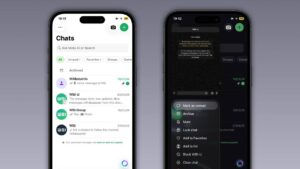
WhatsApp is rolling out the stunning Liquid Glass interface for iPhone users. Learn how to get this translucent iOS 26 design update and enjoy sleek menus.
Recently, WhatsApp released the new Liquid Glass interface for iPhone users globally. Specifically, this update brings a stunning transparent design inspired by iOS 26. As a result, menus and buttons now blend smoothly into the background. Following this, we will explain how you can enable these fresh features.

Spotting the WhatsApp Liquid Glass Tab Bar
To begin with, the floating tab bar is the biggest visual change. However, the new menu hovers beautifully above your active chat window. Furthermore, this semi-transparent finish lets you see background content shining through softly. Consequently, the application looks incredibly polished in both light and dark modes.
Typing with the Translucent iOS 26 Keyboard
In addition, the keyboard looks completely different now. Specifically, developers removed the old flat design in the latest software version. Instead, users now type on a semi-translucent surface with much softer edges. Therefore, your daily typing experience feels far more premium and highly responsive.
Exploring Frosted WhatsApp Business Menus
Moreover, interactive buttons also received a major styling overhaul very recently. To clarify, context menus now carry a beautiful frosted glass appearance everywhere. https://youtu.be/_SHHVOWyLzo?is=TwPUooiByp9ygvw_ Besides that, tapping these custom buttons triggers smooth and fluid system animations. Ultimately, this specific update benefits both standard WhatsApp Messenger and WhatsApp Business.
Upgrading the Voice Message Player Interface
Meanwhile, developers are actively bringing this translucent style to the voice player. In other words, you will soon see a floating audio playback bar. https://diasporadigitalmedia.com/whatsapp-tests-app-bar-logo/ Because of this, users can listen to messages without any visual disruptions. To put it simply, this major overhaul creates a truly unified system appearance. “WhatsApp aims to create a consistent visual experience across all sections.” — Marcus Mendes, Tech Editor
Managing the Gradual Software Rollout Process
On the other hand, not every single iPhone user has this yet. Specifically, the company is releasing version 26.14.76 in a very phased manner. This means that developers can carefully monitor performance and fix software bugs. Despite this, most eligible devices will receive the new layout very soon.
How to Enable the Fresh Update
Nevertheless, securing this beautiful design does not require complicated manual toggles. Instead, users simply need to visit the App Store for quick downloads. Shortly after, ensure your Apple smartphone is running the latest software. As a result, the floating bottom menu will confirm your successful application upgrade.

In summary, the Liquid Glass makeover makes WhatsApp feel incredibly modern today. Even so, millions of users will enjoy this software upgrade shortly. Therefore, keep checking your application store for the newest incoming software updates. Ultimately, this brilliant design change perfectly secures WhatsApp as a top-tier platform.