


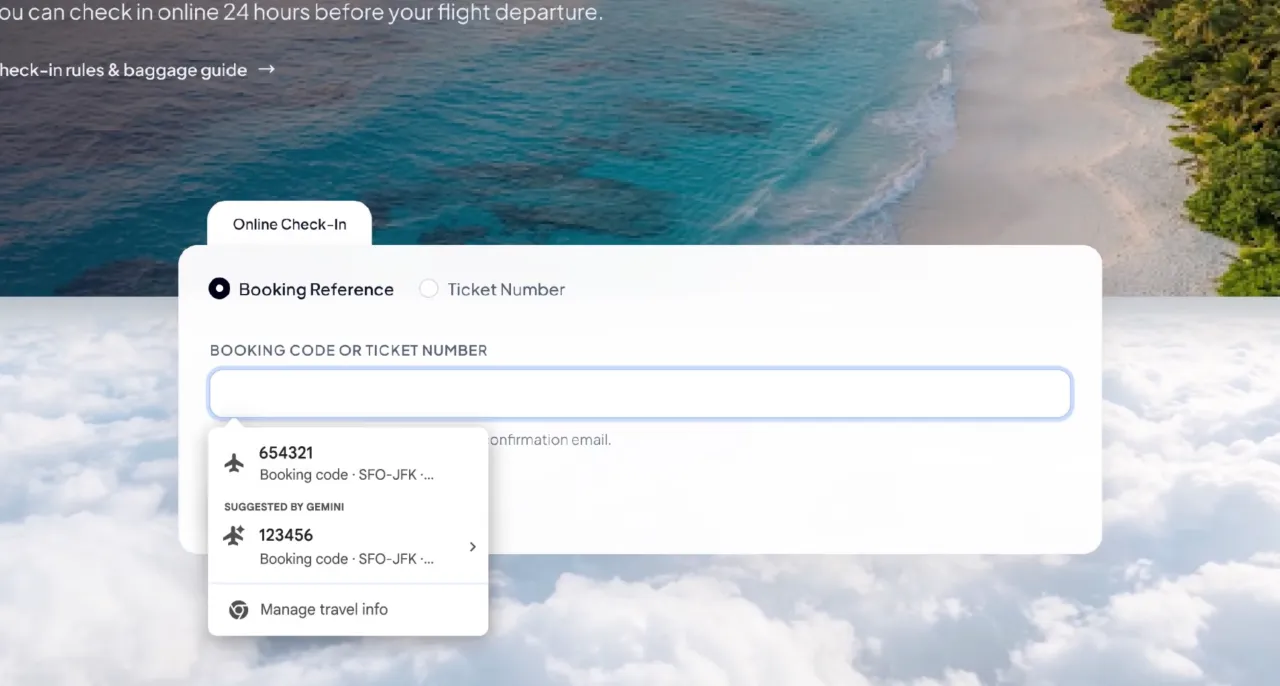
Chrome’s new AI Autofill can use Gmail to suggest flight bookings, order numbers and tracking details, with users controlling access.
Google is upgrading Chrome’s Autofill so it can suggest information pulled from Gmail while users complete online forms. The feature can surface flight bookings, tracking numbers, order details and membership information. It is part of Google’s wider push to connect Gemini with personal data, but it also raises fresh questions about permission and privacy.
Chrome Autofill connects forms to Gmail
Google says enhanced Autofill can use Gemini with Personal Intelligence to retrieve details from Gmail. Chrome may suggest an order number, shipping tracker, flight confirmation, address, phone number or membership ID when a form requests it.  Google’s official Chrome announcement provides the rollout details.
The feature expands beyond traditional Autofill, which usually relies on information saved in Chrome, Google Wallet or a password manager. Instead, Chrome can look for relevant details in email and present a suggestion at the moment it is needed. Users still decide whether to accept the suggested information before it enters a form.
The system could reduce the need to switch between a browser tab and an inbox. It may be useful for travel check-ins, returns, account registrations and online purchases. However, the quality of the suggestion will depend on how clearly a business formats its confirmation emails.
Gmail data access remains optional
Google says users can decide whether to enable enhanced Autofill through Chrome settings. The company also says users can control what the feature can access, while sensitive data is encrypted.
“As always, sensitive data is encrypted and you remain in control.” — Amanda Lim, Product Manager, Chrome
The feature does not mean Chrome can automatically submit every form without review. It provides suggestions for fields, and users remain responsible for checking whether the information is correct. That matters when an email contains several booking numbers, an outdated address or a payment detail that should not be reused.
Google’s Chrome help documentation says Chrome does not share Autofill information without permission. It also says users can manage saved contact, payment, travel and identity information in the browser’s settings.  Google Chrome Autofill privacy and settings guidance explains the available controls.
Rollout begins in the United States
Google says enhanced Autofill is beginning to roll out in the United States. It is available on desktop and on Android and iOS for users with Gemini in Chrome and Personal Intelligence enabled. The company has not announced a wider international rollout in the official blog post.
That limited launch gives Google time to observe how the feature works across different forms and email patterns. It also lets the company test whether users understand when Chrome is using Gmail information. Availability may vary because Google says not all Autofill features work in every region.
The rollout fits into a broader expansion of Gemini across Google products. By linking Search, Gmail, Chrome and other services, Google can make its AI assistant more useful for everyday tasks. At the same time, each new connection increases the importance of clear controls and transparent data practices.
Convenience creates new privacy questions
The practical benefit is straightforward: Chrome can find information that users already have but may not remember. The privacy question is more complicated because inboxes contain travel plans, receipts, account numbers and personal conversations. A browser that can search that information must make its permissions understandable.
Users should review Chrome’s Autofill and Gemini settings before enabling the feature. They should also check suggestions carefully, especially on payment, identity and account-recovery forms. Businesses should avoid placing unnecessary sensitive information in ordinary email confirmations.
People may also want to separate convenience from trust. A correct booking number can save time, but an incorrect suggestion can create a failed reservation or expose data. Clear prompts and easy-to-find controls will be important as Google connects more personal services.
For more coverage of artificial intelligence, Google products and digital privacy, readers can visit Diaspora Digital Media’s  Tech section.
In conclusion, Chrome’s Gmail-powered Autofill could make routine forms faster and less frustrating. The feature is currently limited to a U.S. rollout and requires specific Gemini and Personal Intelligence settings. Its long-term success will depend on whether Google can deliver convenience while keeping personal data controls clear.